Why isn’t your landing page turning more visitors into customers?

LandingQA audits what visitors see and shows where clarity, trust, mobile experience, performance, or the CTA may be costing leads, signups, or sales. You receive prioritized, evidence-backed fixes to test.

See example report →
Confirm your email, then follow the live scan. Payment is requested only to unlock the full report.

Page friction Evidence Testable fix

See what gets in the way of the sale and how to fix it.

One conversion blocker. Five clear steps. A corrected page you can test.

1 Capture Bad example
Bad example

Missing primary CTA above the fold
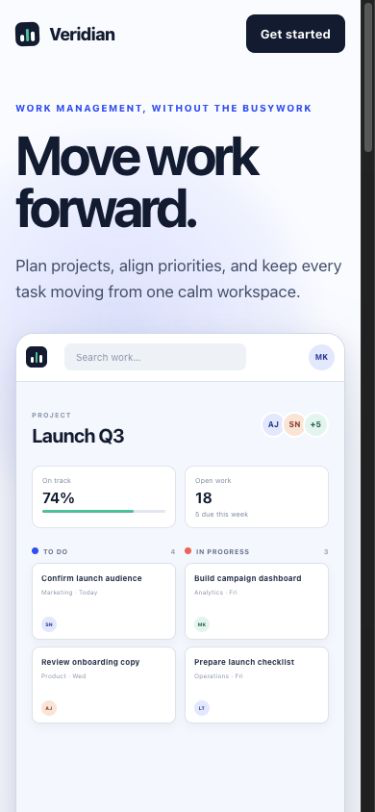
Mobile capture of the fictional Veridian landing page before the correction
Controlled fictional capture at 390 × 844.
2 Measure What the data shows
Why it fails

Measured evidence from the controlled page

CTA starts at 921 px Measured

The primary CTA appears 77 px below the 844 px mobile viewport.

Button height 40 px Measured

Below the 44 px minimum tap-target height used by the audit.

Minimum 44 px recommended
3 Propose Recommended correction

Move the primary CTA above the fold and increase the tap-target size.

4 Preview Corrected example
Valid example

Corrected page preview

Sandbox preview of the fictional Veridian landing page with the primary action moved into the first viewport Get started
Sandbox preview only. The original page remains unchanged.
  1. 1
    CaptureSnapshot the page on desktop and mobile.
  2. 2
    MeasureDetect measurable issues across multiple signals.
  3. 3
    ProposeDraft correction options you can preview safely.
  4. 4
    PreviewSee the corrected page in an isolated sandbox.
  5. 5
    VerifyRescan to confirm what changed and why.
5 Verify What changed
CTA now visible above the fold Button height 46 px (passes the 44 px minimum)
Resolved1 issue addressed
1
Remaining1 issue still present
1
New0 issues introduced
0

Audit evidence, not predicted conversion uplift.

Measured before interpretation Previewed without changing your live site
Public SaaS and service pages Multilingual

Find the friction between the visit and the sale.

LandingQA checks the places where a page can lose clarity, trust, momentum, or action. Every finding lands in one pillar, then rolls into Conversion Readiness, Technical Health, and SEO Health so you know what to fix first.

ClaritySix first-impression answers, checked against your goal
OfferValue, terms, risk, and objection coverage
CTA journeyPrimary action visibility, friction, and continuity
TrustWhich claims carry support, and which do not
Visual hierarchyWhether attention order matches decision order
Mobile390 × 844 layout, tap targets, interaction states
PerformanceLighthouse diagnostics, kept apart from real-user field data
Accessibilityaxe-core rules plus keyboard, focus, and reflow
SEOTitle, description, canonical, robots, language, headings

DECISIONS YOU CAN TRUST

Know what is fact, what is interpretation, and what still needs testing.

Every finding keeps its source, evidence, confidence, and next step.

MEASURED ON THE PAGE

Browser evidence

Dimensions, contrast, links, metadata, performance, and accessibility.

INTERPRETATION

Evidence-based judgment

Clarity, persuasion, trust, visual hierarchy, and journey findings.

YOUR ANALYTICS

Optional private data

Aggregate observations stay separate from page measurements.

NEEDS TESTING

Not a conversion forecast

Use the findings to decide what to inspect and test with visitors.

Every label stays attached to its evidence in the saved report.

EXAMPLE REPORT

See what you get before you pay.

This representative report for a fictional page shows how potential conversion blockers connect to captured evidence, prioritized fixes, and validation plans. The full example includes every score and finding.

REPRESENTATIVE EXAMPLE · FICTIONAL PAGE

Captured evidence

Screenshot · desktop
◆ Veridian Product Pricing Resources Company Get started
Modern workflows for growing teams
Veridian helps teams plan, track, and ship work with confidence, all in one place.
Get startedSee how it works →
ProjectsProgress
Q2 Roadmap75%
Onboarding flow60%
Messaging updates45%
Analytics dashboard90%
Screenshot · mobile (390 px width)
☰ VeridianGet started
Modern workflows for growing teams
Veridian helps teams plan, track, and ship work with confidence, all in one place.
Get started
ship work with confidence, all in one place.
Get started
Evidence confidence: High
Measured by code from this scan’s capture

Top three findings

Top three prioritiesEvidenceCorrectionValidation plan
1Audience is missing above the fold.
INTERPRETATION
Hero screenshot · desktop
Modern workflows for growing teams
Name the audience in the headline.
Recheck first-impression answers.
2Secondary link contrast is only 3.1:1.
MEASURED
Hero link · computed contrast
See how it works →
3.1:1needs 4.5:1
Darken the secondary link to meet 4.5:1.
Rerun the contrast check.
3Canonical points to a redirected URL.
MEASURED
Final URL differs from canonical.
Canonical:https://www.veridian.com/
Update the canonical to the final URL.
Recheck metadata and redirect.
Five more findings, every correction, the validation plans, and the rescan comparison are in the full example report. Open the full report →

Ready to find what may be costing you leads, signups, or sales?

Start with a public URL. See the finding totals before you decide whether to pay.

Check for conversion blockers Open example report

From a public URL to a prioritized conversion plan.

Start the scan before paying. When the report is ready, you see the finding totals and decide whether to unlock the evidence, fixes, and validation plan.

11. Add your URL

Start with any public SaaS or service landing page.

https://yourwebsite.com
Check for conversion blockers
22. Confirm your email

Open the private link on this device or another one.

Check your inboxConfirm to create your account and continue the same scan.
33. Follow the live status or leave

The scan continues on our server and we email you when it is ready.

Scan is active03:18
✓Capture completeChecks and analysis are running
44. See totals and choose whether to unlock

Payment is requested only after the summary is ready.

SCAN COMPLETE

Your report is ready

See the summary now. Unlock the evidence when you are ready.

13 findingsacross 9 categories
CLARITY 3
MOBILE 2
TRUST 2
SEO 1
PERFORMANCE 1
4 MORE 4

Claims, evidence, scores, corrections, and validation plans stay locked until you use one report credit.

What you unlock

  • PrioritiesTop three priorities ranked by evidence and effort.Top three priorities
  • EvidenceAll findings with proof, values, and thresholds.All findings with proof
  • CorrectionsActionable fixes with sandboxed previews.Actionable fixes
  • ValidationA validation plan for every correction.Plan for every correction

WHY LANDINGQA

Why not use a one-off AI chat?

A chat can suggest ideas. LandingQA gives every finding the evidence and next step needed to check the work.

Advice is useful.
A repeatable audit is actionable.
LandingQA
A one-off AI chat
Page evidence
Desktop and mobile screenshots, page structure, links, console, and performance evidence are collected from the scan.
Uses only the page content and context you provide.
Measured facts
Browser rules measure dimensions, contrast, metadata, links, accessibility, and performance before interpretation.
Measurement and interpretation can be mixed together.
Report you can act on
Findings are ranked and paired with evidence, correction options, and a validation plan.
Advice still needs to be checked, organized, and saved.
Repeatable history
The report preserves the scan and rule versions so later rescans can be compared with the same context.
Each conversation needs its own manual context and record.

Questions before you scan

Every measured check is language-agnostic and runs on any page. These checks include contrast, tap targets, metadata, links, Lighthouse, and axe-core. Interpretive findings are multilingual, and each carries its own confidence score. Pages behind a login, paywall, or bot wall cannot be captured, and forms are never submitted.

Corrections are previewed in an isolated sandbox and rescanned there. Nothing is written back to your site, and the browser cannot purchase, register, submit, or mutate anything.

The scan and a one-finding preview run first. Exact price and terms appear before purchase.

The findings are listed above with their measured values. We publish nothing about our own conversion rate because a number from our business would not predict yours. We will still submit to the audit we sell. Scan this page and check the work yourself.

Get a prioritized plan for what to fix next.

Start with the URL. Confirm your email, follow the scan, and decide whether to unlock the complete report when it is ready.